Submitting Orders
Click the image below for a brief overview of the user interface.
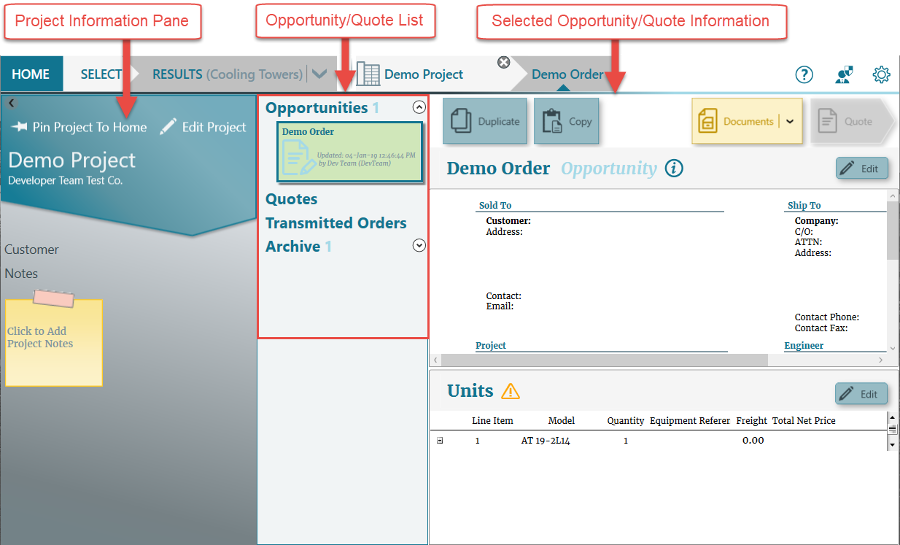
When a quote is ready to be transmitted to EVAPCO, Inc. as an order, simply select the quote and click Submit .
.
The quote is then transmitted and moved to the Transmitted Orders section.
See Welcome to the Spectrum Online Help for more information.
Information Required to Submit Order
If the quote is missing required information, the Submit button will be grayed out, and a warning icon will appear next to the quote name.

Hover the mouse over the warning icon to see which required information is missing.
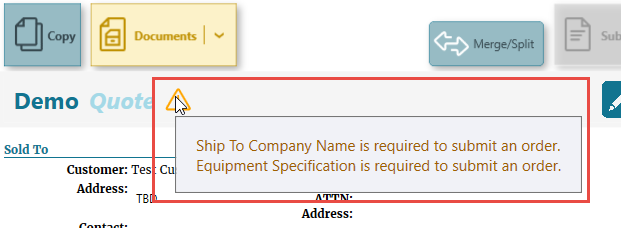
Editing the quote and adding the required information will enable the Submit button.
See Notifications, Warnings, and Errors for more information.
See Editing Opportunities & Quotes for more information.
Reviewing Submitted Orders
Once orders have been submitted, they can be reviewed from the Transmitted Orders section of the Opportunity/Quote list.